
Why?
I’m always on the go and I need to have access to my calendar/s from wherever I am and whenever I need it. Instead of calendars I look at them as sets of data related to the projects I’m working on. During the last years I tested a good number of tools but I got the best out of the ‘Google Calendar – iCal –iPhone or iPod touch‘ combo.
How?
- Enable Google Calendar in Apple’s iCal (this will work only on Mac OS X v10.5… or newer)
- Sync your Google Calendar with your iPhone/iPod Touch (by default only your primary calendar will be synced to your device. To sync additional calendars see next point…)
- Sync your additional calendars with your iPhone/iPod Touch by visiting https://www.google.com/calendar/iphoneselect from any browser (via desktop or mobile device) or For Google Apps users: https://www.google.com/calendar/hosted/YOUR DOMAIN NAME/iphoneselect
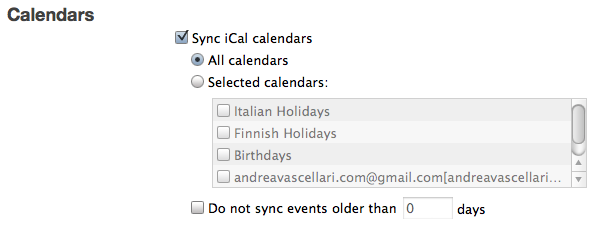
- When you sync your iPhone/iPod Touch on iTunes make sure to select the calendars you want to sync (in the screen-shot below I synced all my calendars). iTunes > iPhone/iPod Touch > Info > Calendars
Advantages?
Your data doesn’t live anymore on single devices like your computer or you mobile phone, it lives in the cloud. Devices are used to simply edit or interact with your data. This means that…
- after you edit one of the calendars (iCal, Google Calendar or iPhone) the changes will reflect in realt-time on all the others. Basically you use ‘one ring to rule them all’.
Tip: If you are using an iPhone/iPod and you don’t have wifi/data connection when you are on the go…no worries. Keep updating your calendar and the when you’ll find a connection (or when you’ll plug your iPod/iPhone to your computer > iTunes) your calendar entries will sync automatically!
- you always have an online backup of all your data. So there’s no problem if you lose your phone or your computer crashes.
- if you don’t have with you or you can’t use your phone or computer, you can still access your data from any other device connected to the internet. (I’ve been in this situation once… and this literally ‘saved me’)
What appears to be a simple synchronization actually opens up a huge number of new doors on how you can better organize and manage your life, work and projects. Give it a try!
If you liked this post you might be interested in also checking out:
Meanwhile… Do you have any related tips you want to share? What advantages you find syncing with the cloud? Questions? Ideas? Special requests? Feel free to share them in the comments or via a quick “comment-ready-tweet” @vascellari!
Andrea
“one ring to rule them all.” perfect analogy.
This blog write-up is merely out of the box. Quite a few other posts i have witnessed on this topic but this will be the 1 i was searching for. I would like to subscribe in your feed for my streaming movies weblog and also bookmarking this web page now.
Hi,
I followed your instruction, but was not able to see the Google Calendar info being updated in iPhone (via over the air). Based on the step below, does this mean iPhone can only be synced with a cable via iTunes instead of Over the Air? (The iCal Google Calendar works fine via desktop) Or I am missing some steps here?
Thanks for anyone’s feedback on this.
================================
When you sync your iPhone/iPod Touch on iTunes make sure to select the calendars you want to sync (in the screen-shot below I synced all my calendars). iTunes > iPhone/iPod Touch > Info > Calendars
Thanks
Here it works also via wifi/air. Check again all the steps maybe you skipped something. I hope you’ll manage to get it working! 🙂
This worked perfectly! Thanks for the thorough instructions!
You are welcome!
Thanks for the tutorial!
Somehow step 3 does not work for me, I can’t get the delegate calendars to sync with my ipod despite updating it to the newest software (4.2.1). The delegate cals also don’t show in the itunes tab.
Do you have any idea how to fix this?
Thanks a lot!
@vic All your Google Calendars must show up here https://www.google.com/calendar/iphoneselect . If they don’t, make sure you’ve setup/created them correctly in Google Calendar. As first step don’t forget to enable Google Calendar in Apple’s iCal. If you followed each step correctly, it should work 😉